
Online class bookings for gyms without the scheduling circus 📅

Yes, EasySocio handles online class bookings. Members book on their own, your team controls spots and schedules, and daily operations stop depending on endless messages.
Start for freeNo credit card required
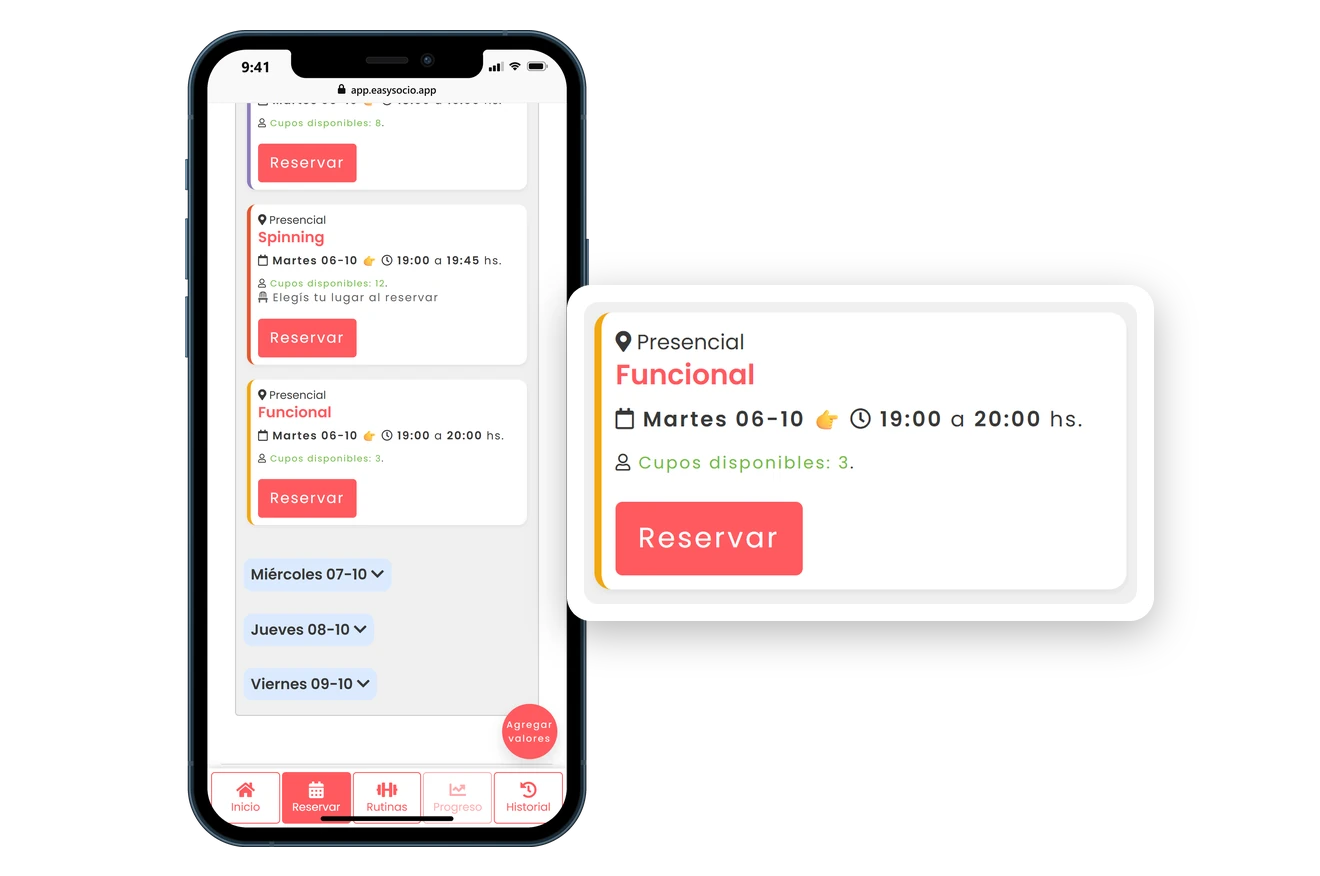
Phone with the EasySocio member app: a member picks the Tuesday 7:00 PM functional training class, with three spots left, confirms the booking and sees it in her upcoming classes.

Functionalities

Ditch the spreadsheets! EasySocio makes gym management as smooth as a skipping rope in beast mode 🔥. From memberships and client tracking to access control, online bookings, and automated expiration reminders—we handle the details so you can focus on growing your business and enjoying the fun parts of your work, not the tedious ones. 🎉

SAY GOODBYE TO ENDLESS SCHEDULING CALLS!

Effortless Online Booking 📆

Allow your clients to book their classes online, with capacity limits and even numbered spots—because nobody likes playing phone-tag.
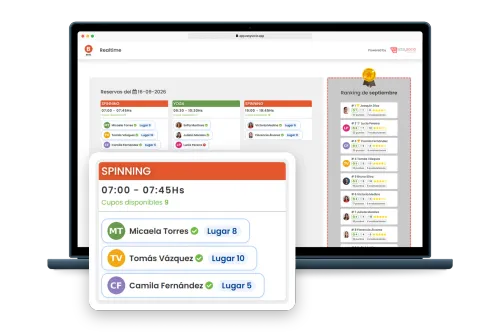
Laptop with the EasySocio Realtime screen, showing the day’s classes, their bookings and the month’s ranking, and a card that enlarges the 7:00 AM indoor cycling class with its three members, each one’s spot and the spots left.
TWO MEMBERS, ONE SPOT. NEVER AGAIN!

Numbered Spots for Your Classes 📍

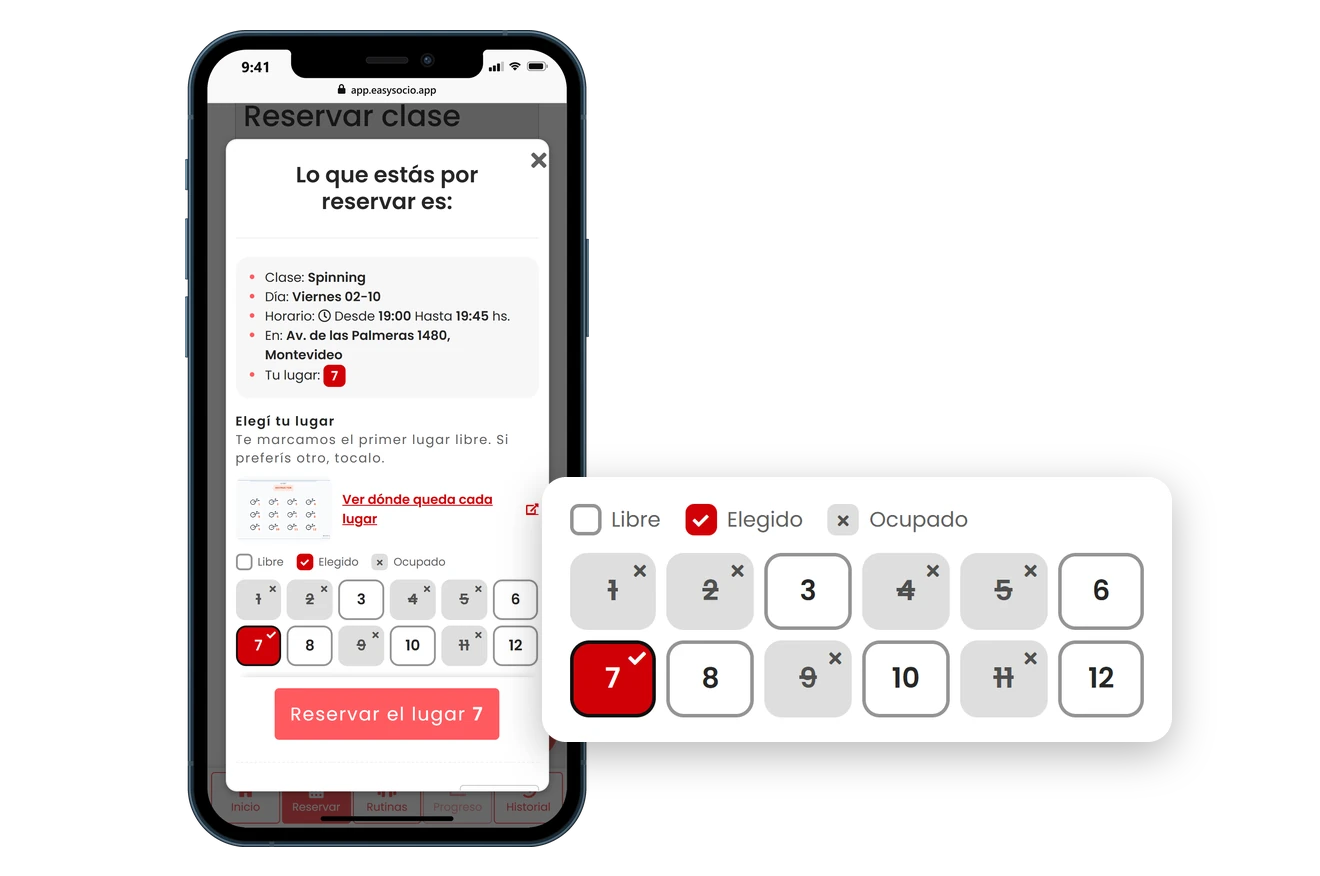
Turn numbered spots on for the classes that need them: each member picks their number when booking and shows up knowing which bike, reformer or station is theirs.
Start for freeNo credit card required
Video of a phone with the EasySocio member app booking the 7:00 PM indoor cycling class and picking bike 7 on the numbered spot map, through to the confirmation of spot 7.
HOW’S THE WEEK LOOKING? SEE IT AT A GLANCE

Your Week of Bookings in a Calendar 👀

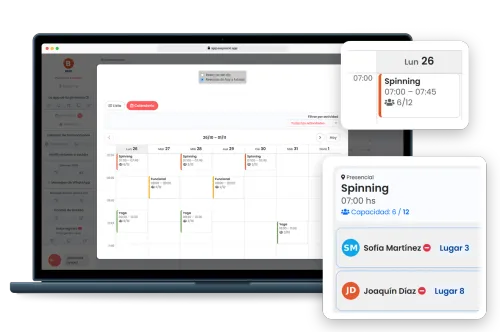
In your dashboard, bookings can be viewed as a list, as always, or as a calendar. On a computer you get the whole week, Monday to Sunday, with every class at its time, in its activity’s color and with how many spots are booked; on a phone, one day at a time. Tap a class to see who booked and mark attendance. And when a member books from their phone, it shows up on its own.
Start for freeNo credit card required
Laptop showing a gym’s EasySocio dashboard with the week’s bookings in Calendar view: each class at its time, in its activity’s color, with how many people booked. One card zooms in on Monday’s 7:00 AM indoor cycling class, with 6 of 12 spots booked, and another shows who booked and which spot they took.
SIGN-UPS MADE STRESS-FREE

Easy Self-Registration 🚀

Let your members register themselves online in seconds—because paperwork is so last decade.
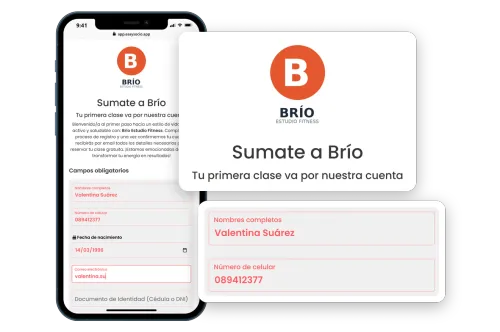
Phone with a gym’s self-registration page in EasySocio, with the logo, the welcome title and the form half filled in, enlarged in two cards.
AUTOMATIC COMMUNICATION THAT WON’T MAKE YOU SWEAT

Automatic WhatsApp Messages 📲

There are two: a welcome message when you add a new member and a reminder before their membership expires. You can turn each one on or off, and each message sent is deducted from a message bonus that’s topped up with every renewal of your EasySocio plan.
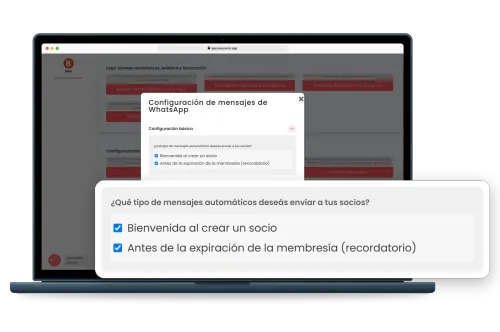
Laptop with a gym’s WhatsApp message settings in EasySocio and a card that enlarges the two automatic messages turned on: the welcome message when a member is added and the reminder before the membership expires.
SMARTER DECISIONS, FEWER HEADACHES

Easy Analytics 📈

Make informed choices easily with clear, actionable insights—no math required!
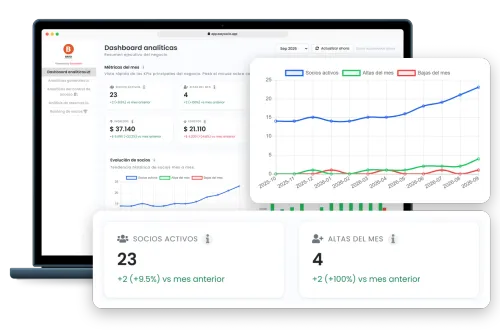
EasySocio analytics dashboard on a laptop with September selected, highlighting 23 active members and 4 new sign-ups for the month, both up on the previous month, and a 12-month chart where active members grow from 14 to 23.
WHO JOINED, WHO’S ACTIVE, AND WHO OWES YOU MONEY?

Membership Management Made Easy 📋

Easily track memberships, expirations, and payments. Leave boring admin work to EasySocio and reclaim your free time!
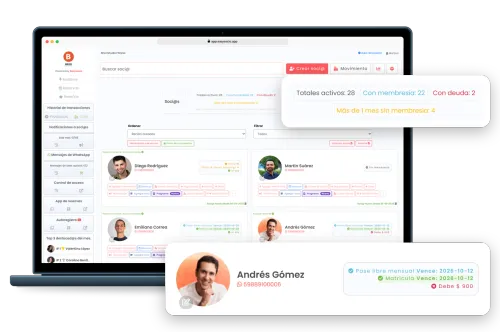
EasySocio member list on a laptop, with counters for active members, members with a membership, members who owe money and members without a membership for over a month, and one member’s card enlarged with his membership, expiration date and balance due.
OPENED ANOTHER LOCATION?

Multiple locations, one account 🏢

Each location gets its own cash register, stock and front desk, and its name is always on screen so everyone knows where payments are being taken. Each team member works at their location or at all of them, and members check in and book at any of them with the same membership. You add a location from Settings, and your price stays the same.
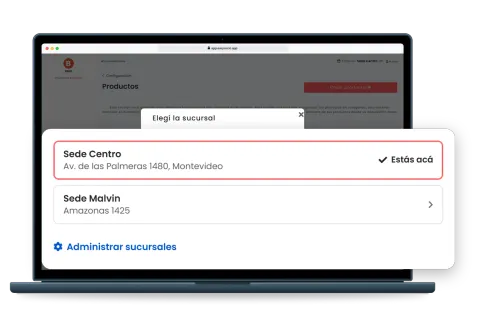
Laptop with a gym’s EasySocio dashboard and the window to switch locations. A card enlarges the gym’s two locations, each with its address, and the link to manage them.
LESS MANUAL COORDINATION, BETTER ATTENDANCE FLOW

Online bookings that make gym operations easier

Keep schedules, class capacity, cancellation windows and booking visibility in one place so your front desk is not stuck playing traffic controller all day.

Every feature, on every plan

Yes, the free one too. Nothing here is locked behind a paywall: the only thing that changes between plans is how many members you can register.

Included in every plan

Your gym’s own app, on your members’ phonesNew

Your logo and your name on their home screen. Members install it from your link, without going through any app store, and open it with one tap to check their bookings, workout and membership.

See how it works
  • Membership Management
  • Access Control
  • Online Schedule
  • Products and Stock Management
  • Multiple locations at no extra cost

One exception: facial recognition and turnstile integrations are quoted separately. Wiring faces to hardware is a whole other level of tech magic. 🤖🔐

It is USD 25 a month on top of your plan, and nothing else: no setup or installation fees. See how access control works

You’re viewing prices for Sudafrica. If that’s not your country, select a different one from the flag.

08000+

30 members

Free

Free

Up to 30 members

Free

forever

Baby

Up to 100 members

USD 14

/month

Starter

Up to 200 members

USD 20

/month

Estandar

Up to 400 members

USD 30

/month

  • No credit card required
  • Member app with your logo, on every plan New

How does the free plan work? Free gym software →

Showing 1 of 3

image-paypal
image-master
image-visa
image burppes
Burpees
Pricing Notes
If you have more than 8000 members, don't worry about the price. Contact us for a personalized quote.
Adding a location doesn’t change the price: the plan is based on the number of members across the whole gym, counting every location.
FREQUENTLY ASKED QUESTIONS

Everything about online gym class bookings

Straight answers for teams comparing booking tools.

Yes. You can publish schedules, set class capacity and let members book online without relying on spreadsheets, WhatsApp threads or front-desk juggling.
Yes. Members can book from their own access, and your staff can also create bookings for them when needed.
Yes. You can define maximum spots per class and monitor availability in real time so you avoid overbooking and last-minute confusion. And if every member has a fixed station in that class, turn on numbered spots and each member picks their own when booking.
Yes. You turn it on for any in-person class that has a capacity limit, and spots run from 1 to the capacity: a class with 15 spots is numbered 1 through 15. Members see which ones are taken, pick their own and arrive knowing their number. You can also upload a photo or floor plan of the room.
Yes. With online bookings turned on, one button in the dashboard switches from the usual list to the calendar, with nothing to set up: it uses the class schedule and activity colors you already have. It covers the current week up to three months ahead, and when you open a class with numbered spots you can see which spot each member took. It’s the gym’s view: members still book each class from their phone, just like before.
Yes. Your team can book or cancel on a member’s behalf, mark attendance and see how full each class is. Capacity limits apply to staff bookings too. To switch a member to another class, cancel their booking and create a new one.
Yes. Each class schedule belongs to a location, and when booking in the app, members pick the location and see its classes; the booking confirmation and email say where it is. On the dashboard, staff at one location see and manage that location’s bookings, and a closure day can close every location or just one.
Yes. You choose how many hours before a class members can cancel. If a member uses a class pack and cancels in time, the class goes back to the pack. Once that window has passed, members can’t cancel on their own, unless they booked less than 15 minutes ago. Your staff can still cancel, but outside the window the class doesn’t go back to the pack on its own.
No. EasySocio is not a payment gateway. It helps you manage bookings, memberships and payment follow-up, but it does not process charges from members.
Expiry and welcome messages are sent from an EasySocio number using Meta-approved templates. Each one uses a message from a bonus that’s credited every time your EasySocio plan renews. Extra messages can be bought separately and don’t expire.
AVAILABLE IN YOUR COUNTRY

Where are you reading from?

We go into detail per market: payment habits, local wording and the questions that keep coming up in each country.