
Features so easy, your grandma could run a gym!

Explore EasySocio’s features—so intuitive you'll wonder why we even wrote instructions.
Start for freeNo credit card required
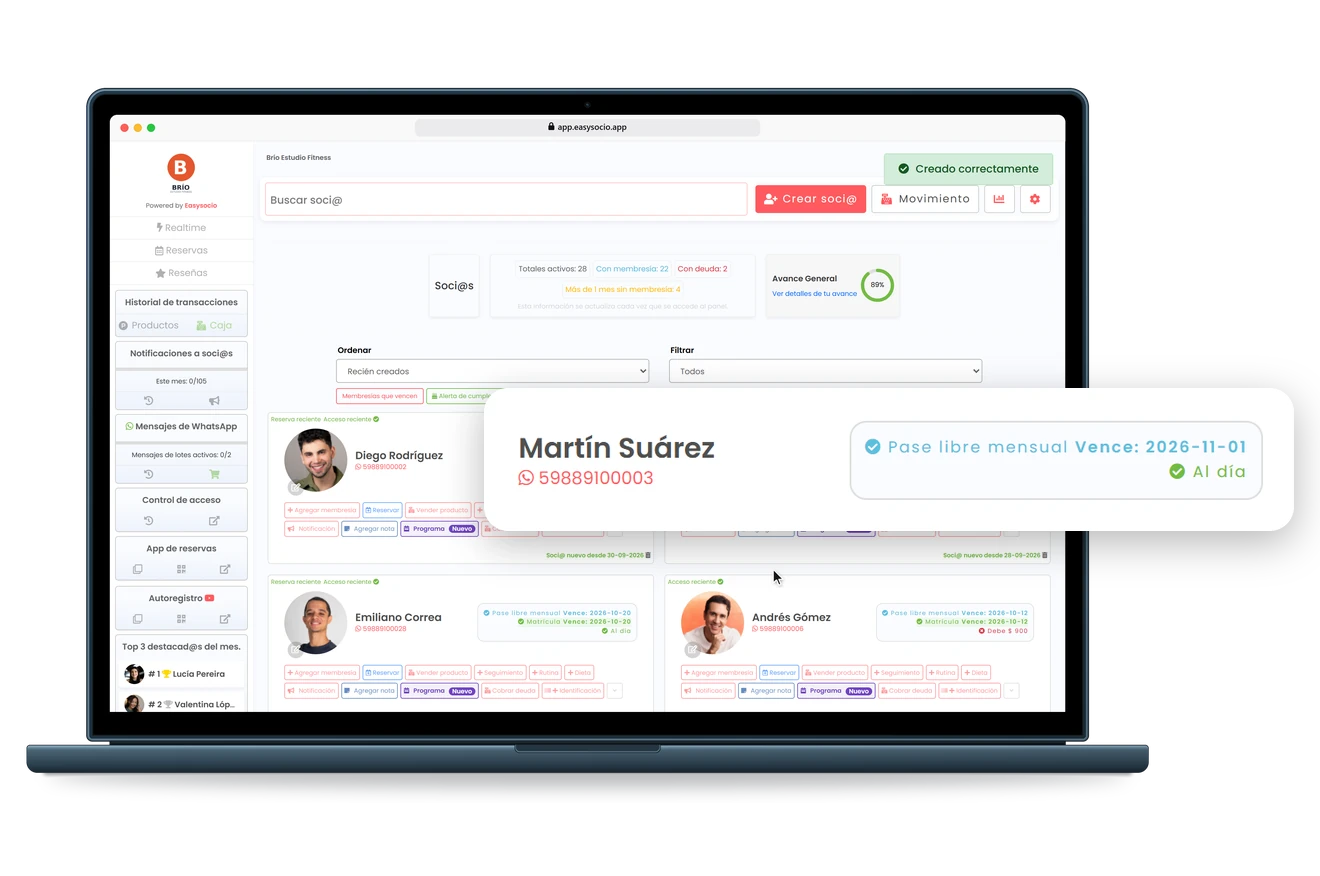
EasySocio dashboard on a laptop: the owner sells a monthly unlimited pass to Martín Suárez, takes the payment in cash and his profile shows the membership as active and paid up.

Functionalities

Ditch the spreadsheets! EasySocio makes gym management as smooth as a skipping rope in beast mode 🔥. From memberships and client tracking to access control, online bookings, and automated expiration reminders—we handle the details so you can focus on growing your business and enjoying the fun parts of your work, not the tedious ones. 🎉

YOUR OWN APP, WITH YOUR LOGO? YOU ALREADY HAVE IT

Your Gym’s Own App, with Your Logo 📲

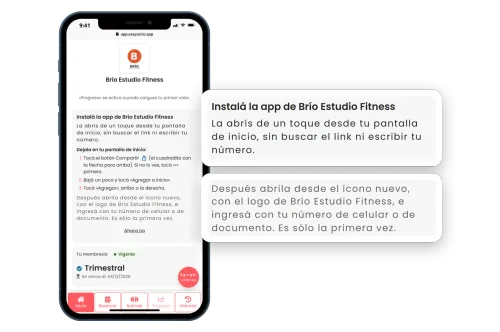
Your members can have your gym’s app on their phone’s home screen, with your logo and your name. They open it with one tap to check their bookings, workout and membership, without looking for the link or typing their number every time. It’s not on the Play Store or the App Store: they install it from your link, on iPhone and on any other phone. Sharing it takes a minute: send it via WhatsApp with a ready-made message, print a QR poster for your front desk or copy the message with your link. And it comes with every plan, the free one too.
Start for freeNo credit card required
Phone with a gym’s own app, with the gym’s logo and name at the top and the card inviting the member to install it on the home screen, so they can open it with one tap without looking for the link or typing their number. Two cards enlarge the invitation and the step to open it from the new icon with the gym’s logo.
WHO JOINED, WHO’S ACTIVE, AND WHO OWES YOU MONEY?

Membership Management Made Easy 📋

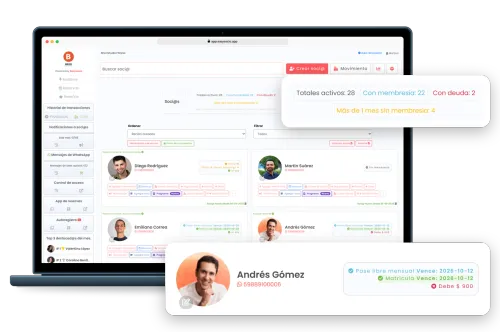
Easily track memberships, expirations, and payments. Leave boring admin work to EasySocio and reclaim your free time!
Start for freeNo credit card required
EasySocio member list on a laptop, with counters for active members, members with a membership, members who owe money and members without a membership for over a month, and one member’s card enlarged with his membership, expiration date and balance due.
NEVER FORGET WHAT MATTERS ABOUT EACH MEMBER!

Member Notes on Every Profile 📝

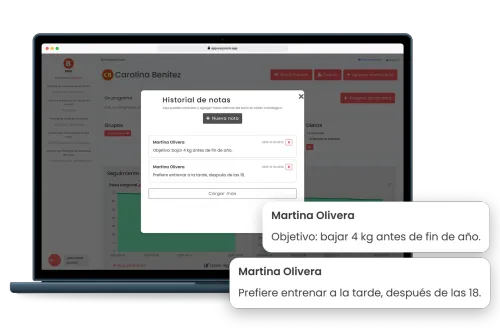
Preferences, injuries or anything else worth remembering: each note is saved on the member’s profile with the date and time, so your whole team is in the loop.
Start for freeNo credit card required
Member notes in EasySocio on a laptop: the note history on a member’s profile, showing who wrote each note and when, and two cards that enlarge her notes, one with her goal of losing 4 kg before the end of the year and another saying she prefers to train in the afternoon, after 6 PM.
IS YOUR WHOLE TEAM SHARING ONE PASSWORD?

Staff Accounts with Limited Access 👥

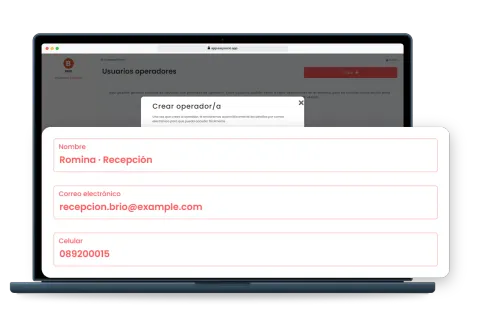
Front desk staff and coaches each get their own account, set up with just their name, email and phone number, and their login details arrive by email. With that account they look after members, sell memberships and products, take payments, book classes and check members in. Your gym’s settings (memberships and prices, the product catalog and the class schedule), viewing the cash register and its transactions, the analytics and adding or removing users are for you alone: their account has no access to any of that. Every cash register transaction carries the name of whoever recorded it. With more than one location, you choose which one each person works at, or all of them.
Start for freeNo credit card required
Laptop with a gym’s staff accounts page in EasySocio and the window for adding a new one. A card enlarges the form: the name, email and phone number of the front desk team member being added.
OPENED ANOTHER LOCATION?

Multiple locations, one account 🏢

Each location gets its own cash register, stock and front desk, and its name is always on screen so everyone knows where payments are being taken. Each team member works at their location or at all of them, and members check in and book at any of them with the same membership. You add a location from Settings, and your price stays the same.
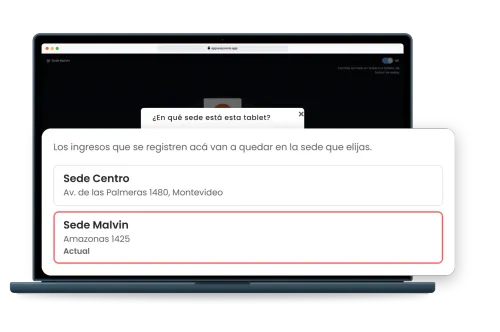
A location’s front desk access control screen in EasySocio, with the window to choose which location the tablet is at. A card enlarges the gym’s two locations: check-ins are recorded at the one chosen.
SAY GOODBYE TO ENDLESS SCHEDULING CALLS!

Effortless Online Booking 📆

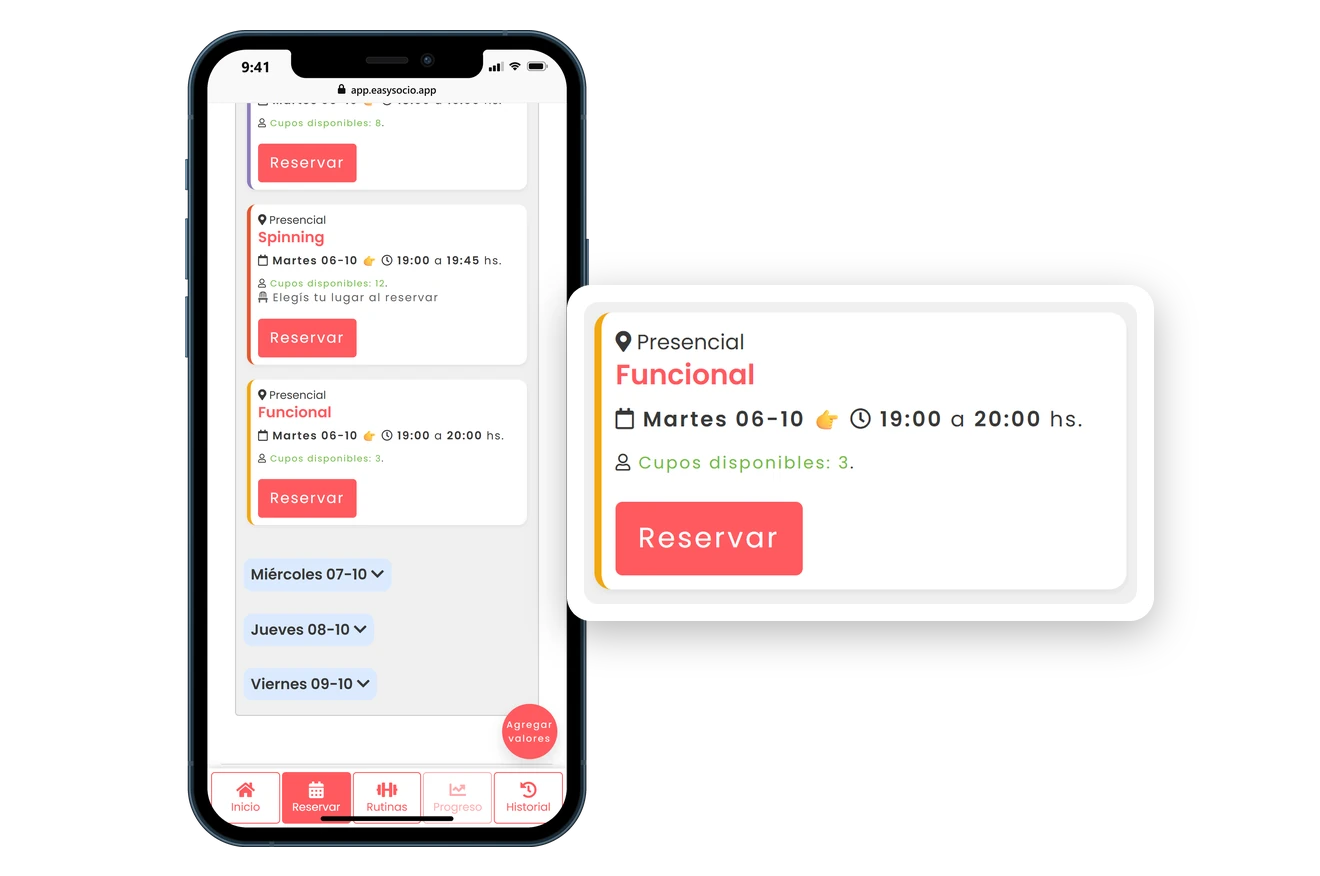
Allow your clients to book their classes online, with capacity limits and even numbered spots—because nobody likes playing phone-tag.
Start for freeNo credit card required
Phone with the EasySocio member app: a member picks the Tuesday 7:00 PM functional training class, with three spots left, confirms the booking and sees it in her upcoming classes.
TWO MEMBERS, ONE SPOT. NEVER AGAIN!

Numbered Spots for Your Classes 📍

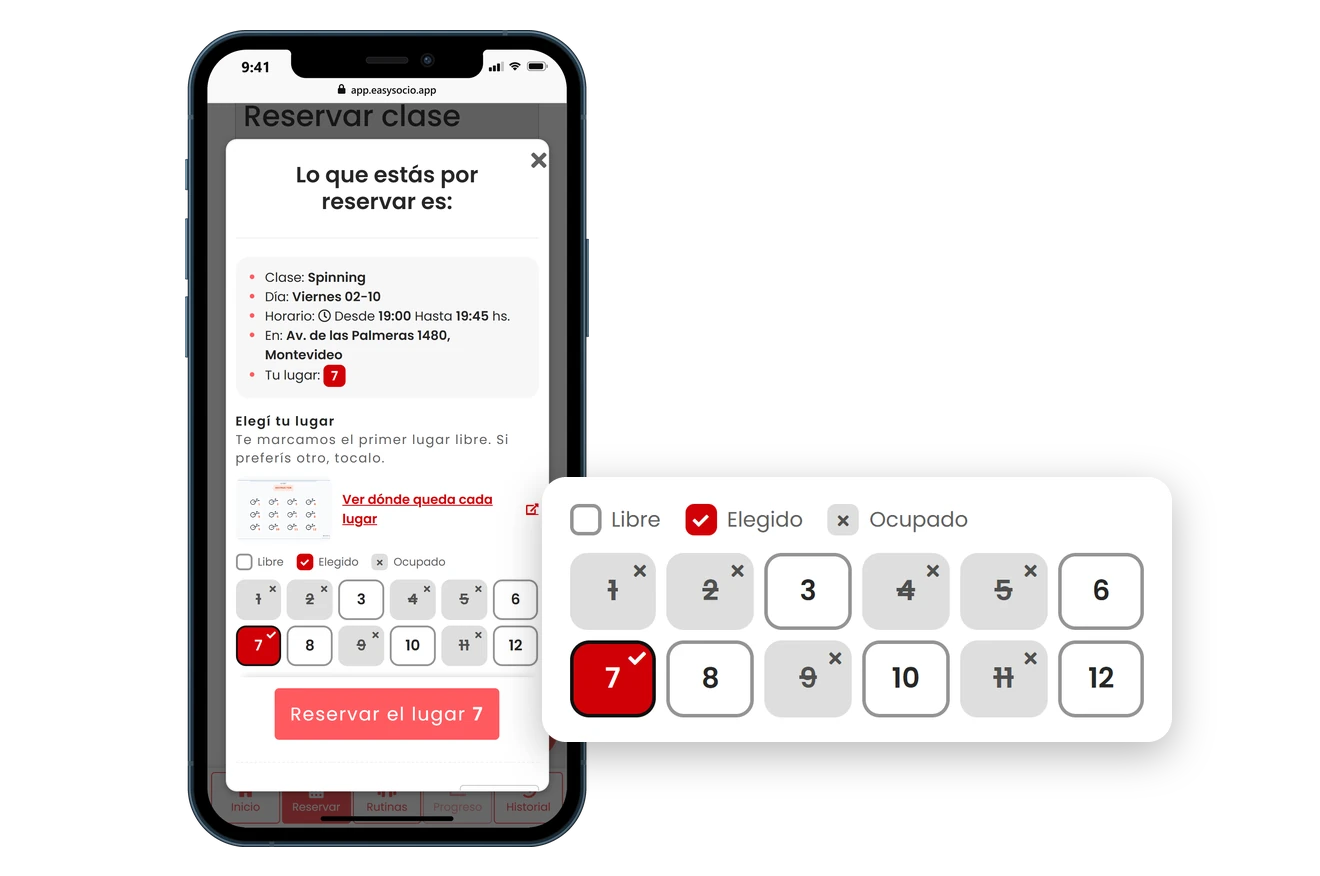
Turn numbered spots on for the classes that need them: each member picks their number when booking and shows up knowing which bike, reformer or station is theirs.
Start for freeNo credit card required
Video of a phone with the EasySocio member app booking the 7:00 PM indoor cycling class and picking bike 7 on the numbered spot map, through to the confirmation of spot 7.
THE GYM SCREEN THAT UPDATES ITSELF

Real-Time Class Screen 📺

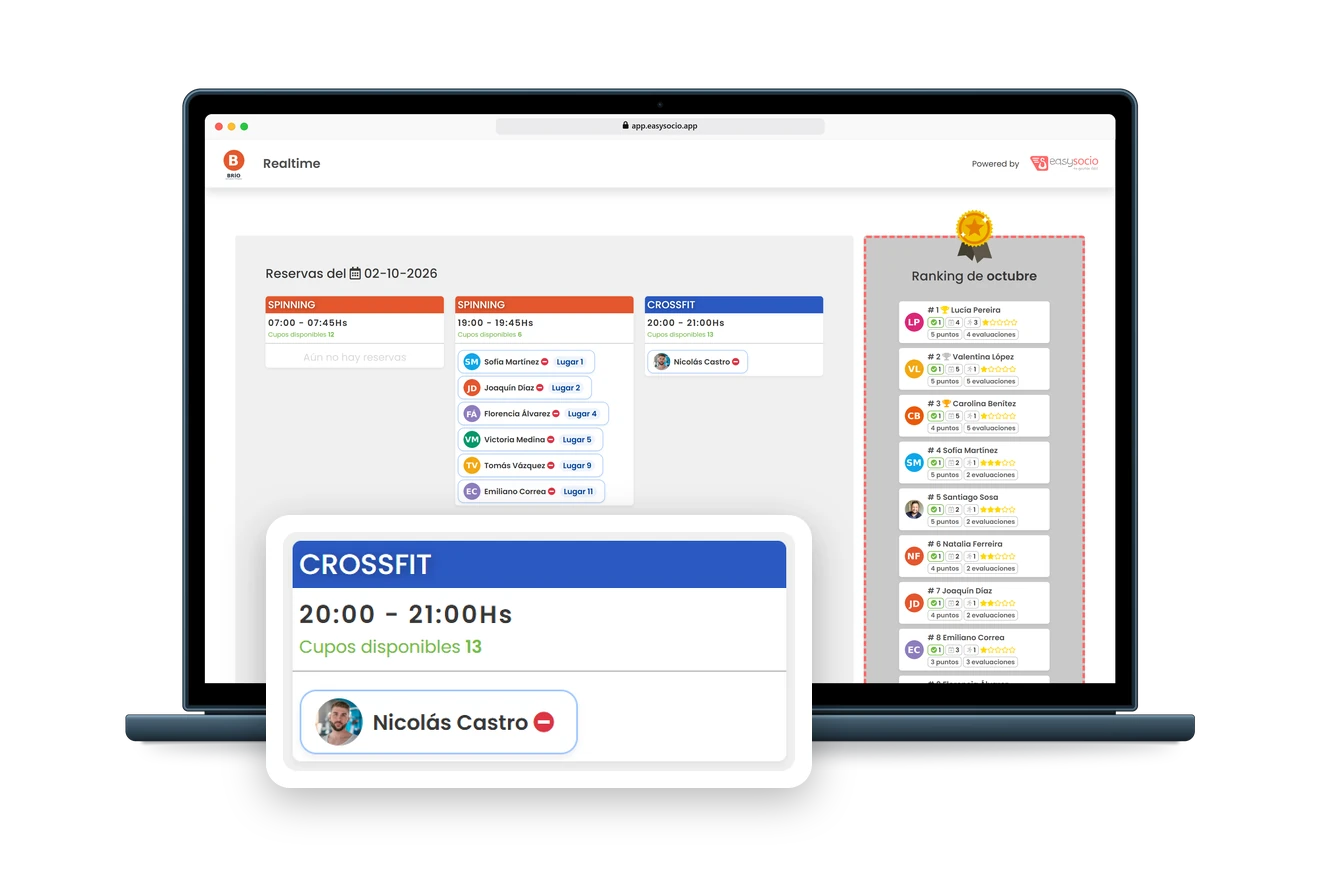
Put today’s classes up on a screen at your gym, with who booked each one, the spots left and this month’s ranking. When a member books or cancels, it updates within seconds.
Start for freeNo credit card required
EasySocio Realtime screen on a laptop: with the day’s classes in view, a new booking for the 8:00 PM CrossFit class shows up on its own and the spots left go from 14 to 13.
AUTOMATIC COMMUNICATION THAT WON’T MAKE YOU SWEAT

Automatic WhatsApp Messages 📲

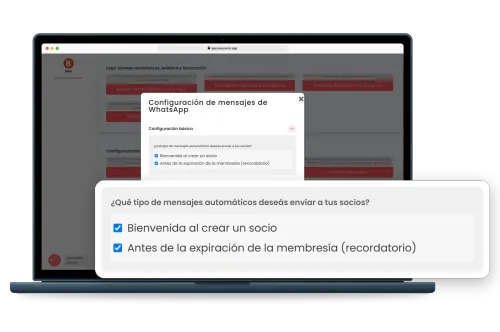
There are two: a welcome message when you add a new member and a reminder before their membership expires. You can turn each one on or off, and each message sent is deducted from a message bonus that’s topped up with every renewal of your EasySocio plan.
Start for freeNo credit card required
Laptop with a gym’s WhatsApp message settings in EasySocio and a card that enlarges the two automatic messages turned on: the welcome message when a member is added and the reminder before the membership expires.
MEMBER EMAILS, ALREADY WRITTEN FOR YOU

Personalized Automatic Emails ✉️

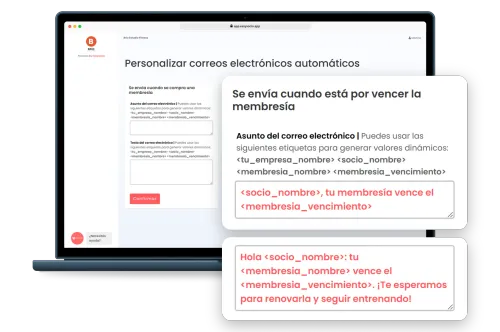
When members buy a membership, a few days before it expires and on their birthday, they get an automatic email. The texts come ready to go and you can edit them, using tags that fill in each member’s name, membership and expiry date. They can also go out from your gym’s own email address, like your Gmail, with a heads-up on your dashboard’s home screen if it stops working.
Start for freeNo credit card required
Laptop with a gym’s automatic email settings in EasySocio and two cards that enlarge the membership expiry reminder: its subject and its text, with tags that are replaced by the member’s name, their membership and the expiry date.
SCHEDULE CHANGE? LET YOUR MEMBERS KNOW

Notifications for Your Members 📣

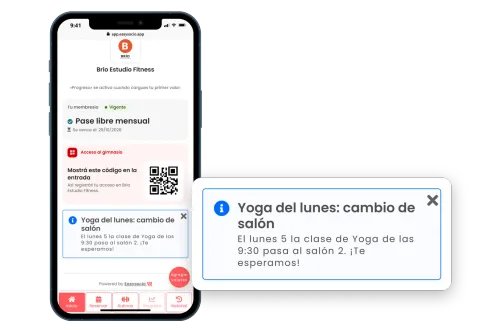
Write a notice and choose who gets it: one member, everyone or just some of them, such as members who owe money, members without a membership or those who bought a specific one. They see it in the member app, under notifications, as soon as they open it, and you can also highlight it as a banner on the app’s Home tab and send it by email. Unlike the automatic WhatsApp messages and emails, you write this one yourself, whenever you need it. You can send up to three notifications a month for every member your plan includes.
Start for freeNo credit card required
Phone with the EasySocio member app on the Home tab and a card that enlarges the notice the gym sent, highlighted as a banner: the Monday 9:30 yoga class is moving to room 2.
NEVER MISS ANOTHER BIRTHDAY!

Birthday Alerts 🎉

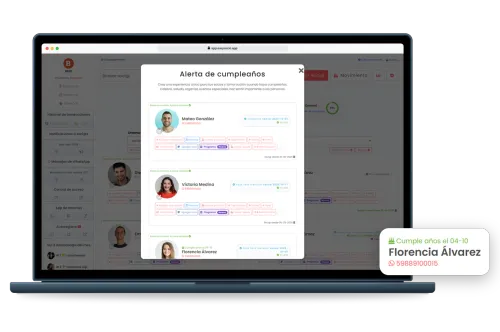
See who has a birthday in the next 10 days, with their WhatsApp number right there so you can wish them a happy birthday.
Start for freeNo credit card required
EasySocio birthday alert on a laptop: the list of members with birthdays in the coming days and a card that enlarges one member’s birthday, her name and her WhatsApp number to send her greetings.
NEVER LOSE TRACK OF YOUR PROTEIN SHAKES AGAIN!

Easy Inventory & Product Sales 📦

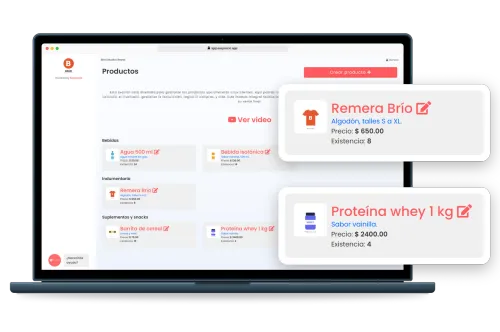
Effortlessly manage your stock and product sales to avoid those dreaded “out-of-stock” surprises.
Start for freeNo credit card required
Laptop with a gym’s products in EasySocio grouped by category, and two cards that enlarge a T-shirt and a protein tub with their price and stock on hand.
NEED A RECEIPT? IT’S READY TO PRINT

Receipts & Printing Your Way 🧾

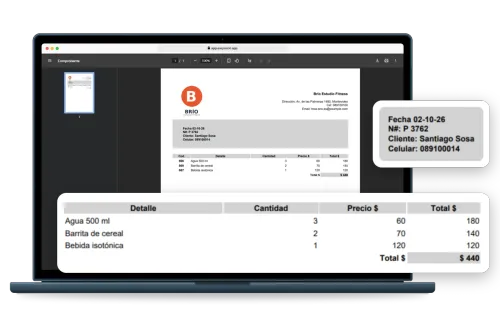
Print receipts on A4 paper or on a receipt printer: you choose the format once. Plus QR code posters for class bookings and self-registration, ready to put up at the front desk.
Start for freeNo credit card required
Laptop with an EasySocio receipt on A4 paper ready to print, with the gym’s logo and details; two cards enlarge the receipt number and the member who made the purchase, and each product with its quantity, price and total next to the sale total.
TRAINING AS A FAMILY? ONE MEMBERSHIP IS ENOUGH

Family Plan: One Pays, Others Train Too 👨‍👩‍👧

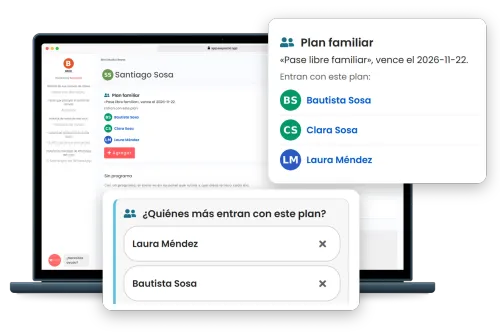
Mark a time-based membership as a family plan and, when you sell it, pick from your members who else uses it: the buyer’s family, a company’s employees or a team. Each of them, with their own profile and phone number, checks in through access control, books their classes and sees the membership in their app. It’s one sale, one payment and one renewal, all on the payer’s account, and you can add or remove people from the payer’s profile anytime. If the payer falls behind, nobody gets in with the plan until it’s paid.
Start for freeNo credit card required
Laptop showing a member’s profile in the EasySocio dashboard with the Family plan card: a family unlimited pass is active, and Bautista Sosa, Clara Sosa and Laura Méndez use this plan. One card zooms in on that list and another shows the membership sale, where you choose who else uses the plan.
KNOW EXACTLY WHO’S IN YOUR GYM—WITHOUT SPYING!

Simple & Secure Access Control 🔑

Keep tabs on who enters, how many people are around, and manage access based on membership type or schedule effortlessly.
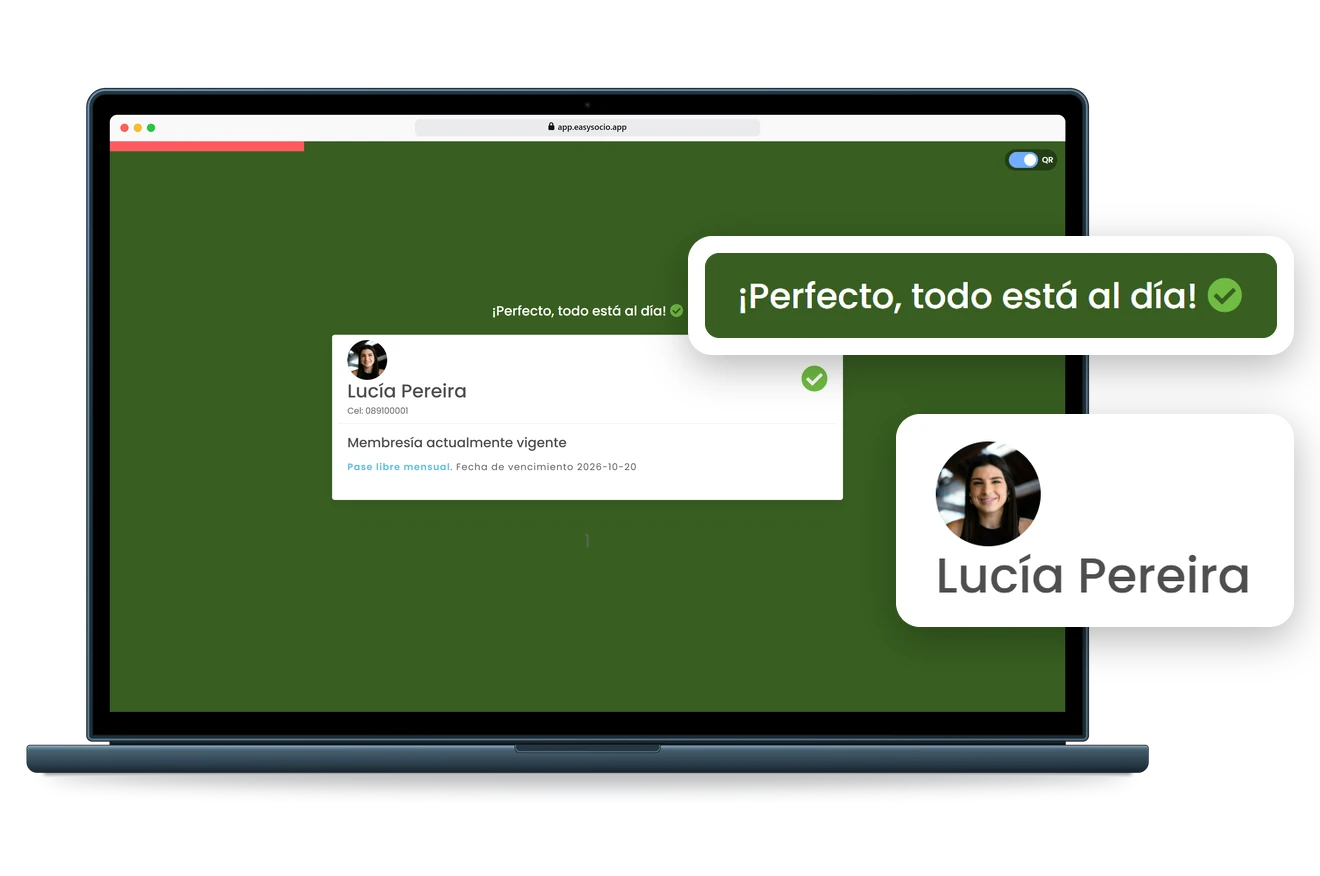
EasySocio access control screen on a laptop: the QR reader lets in a member who is up to date and stops another one who owes $1,500.
FASTER THAN SAYING "WELCOME BACK!"

Barcode ID Cards for Quick Entry 🎟️

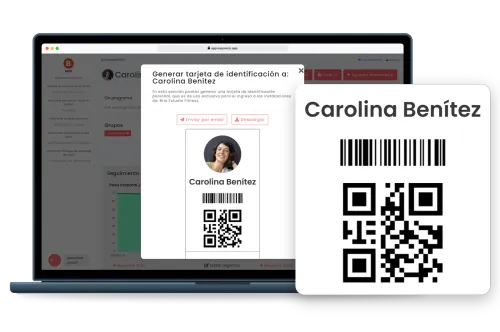
Make identity checks fast, easy, and secure. Cards are emailed or downloadable instantly for stress-free management.
Start for freeNo credit card required
EasySocio dashboard on a laptop generating a member’s ID card, with her photo, her name, a barcode and a QR code, ready to email or download.
HEAR WHAT YOUR CUSTOMERS REALLY THINK!

Easy Customer Feedback ⭐⭐⭐⭐⭐

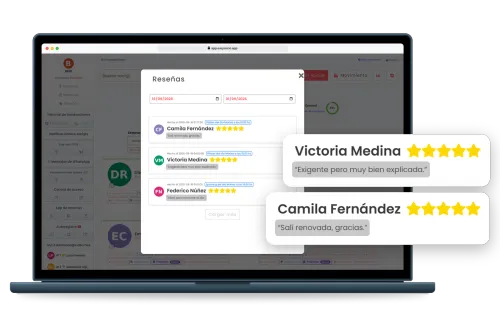
Gather client feedback effortlessly and boost your business by knowing exactly how to improve.
Start for freeNo credit card required
Member reviews in EasySocio on a laptop: each member rates the class with stars and leaves a comment, and two cards enlarge five-star reviews, one praising a demanding but very well explained class and another from a member who left feeling refreshed.
EVERY REP COUNTS, AND NOW IT’S ON RECORD

Member Results, Exercise by Exercise ✍️

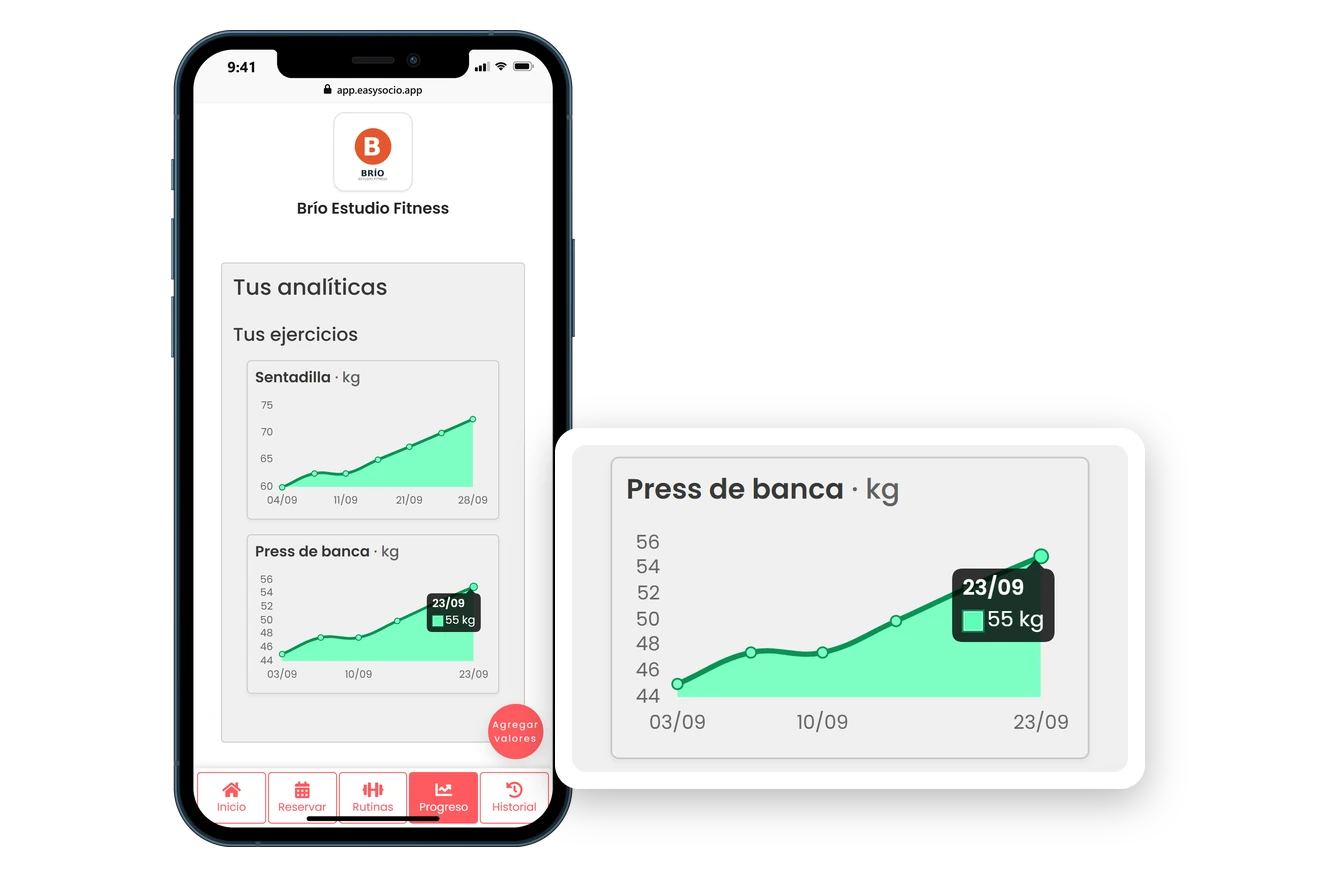
You choose which exercises to track and in what unit (kg, reps, time or distance). For those, members see their latest result right on the exercise card, log a new one without leaving their routine and follow their progress on a chart.
Start for freeNo credit card required
Phone with the EasySocio member app: on the bench press card in his routine, a member sees his last mark, 55 kg, and the button to log a new one; on the Progress tab, that exercise’s chart shows how the weight went up in September.
HOW’S THE WEEK LOOKING? SEE IT AT A GLANCE

Your Week of Bookings in a Calendar 👀

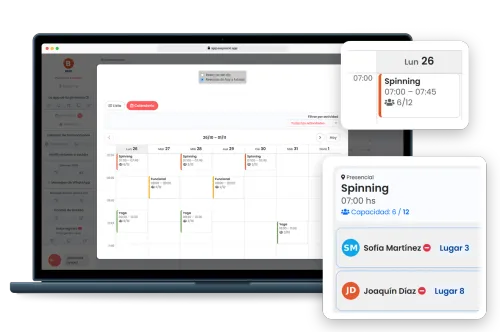
In your dashboard, bookings can be viewed as a list, as always, or as a calendar. On a computer you get the whole week, Monday to Sunday, with every class at its time, in its activity’s color and with how many spots are booked; on a phone, one day at a time. Tap a class to see who booked and mark attendance. And when a member books from their phone, it shows up on its own.
Start for freeNo credit card required
Laptop showing a gym’s EasySocio dashboard with the week’s bookings in Calendar view: each class at its time, in its activity’s color, with how many people booked. One card zooms in on Monday’s 7:00 AM indoor cycling class, with 6 of 12 spots booked, and another shows who booked and which spot they took.
MEAL PLANS YOUR MEMBERS WON’T HATE

Effortless Diet Planning 🍎

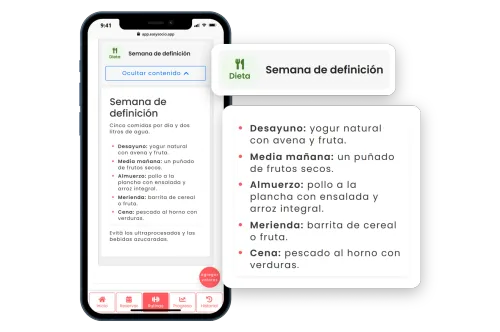
Create and share tasty, easy-to-follow meal plans, making nutrition guidance simple and engaging.
Start for freeNo credit card required
Phone with the EasySocio member app showing an open cutting-week diet, with the day’s meals from breakfast to dinner enlarged in a card next to the diet’s name.
HOW MUCH SHOULD BE IN THE DRAWER?

Your Daily Cash Register, Balanced to the Cent 💵

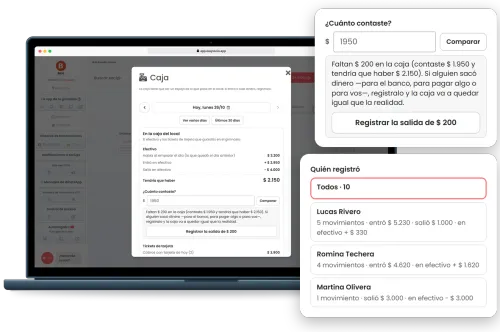
The register opens on today’s date and shows how much should be in the drawer: the cash, including what was left from the day before, and the card receipts; transfers and online payments are shown separately. At closing, enter what you counted and the register tells you whether it balances, or whether money is missing or left over. You also see what each person on your team recorded.
Start for freeNo credit card required
Laptop showing a gym’s daily cash register in EasySocio: today, Monday 10/26, the cash drawer card shows the cash and that there should be $2,150. One card zooms in on the count: $1,950 was counted and the register warns that $200 is missing, with a button to record it as taken out. Another shows who recorded what: each team member’s number of transactions and how much came in and went out.
TURN YOUR MEMBERS INTO LOCAL CELEBRITIES!

Friendly Member Rankings 🥇

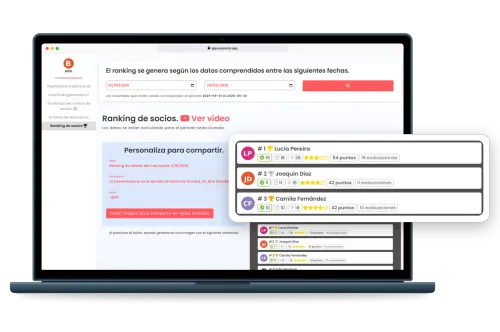
Easily track top-performing members, organize fun competitions, and celebrate achievements.
Start for freeNo credit card required
EasySocio member ranking on a laptop with September selected and the podium enlarged: Lucía Pereira, Joaquín Díaz and Camila Fernández with their trophies, bookings, check-ins, stars and points.
TOOK CASH FROM THE DRAWER TO THE BANK? THAT’S NOT AN EXPENSE

Withdrawals and Expenses, Each in Its Place 💸

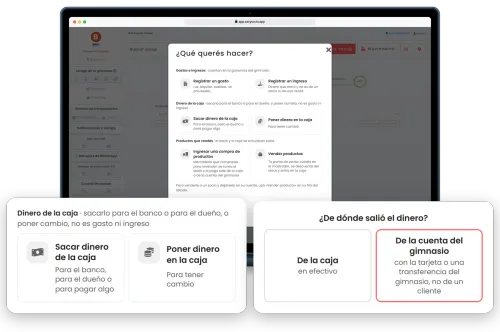
Taking cash from the drawer to the bank, taking it out for the owner or putting in change is recorded right from the register, and none of it counts as an expense or as income in your analytics: a withdrawal doesn’t shrink your profit. Your team can take money out and put it in from “Transaction” too, where every expense asks whether the money came from the drawer or from the gym’s account.
Start for freeNo credit card required
Laptop showing the EasySocio dashboard with the Transaction window open on “What do you want to do?”. One card zooms in on drawer money, which is neither an expense nor income, with the options to take money out of the drawer and to put money in. Another shows the question an expense asks, where the money came from, with the gym’s account selected.
HELPING MEMBERS HIT THEIR GOALS (WITHOUT STALKING)

Easy Member Progress Tracking 📊

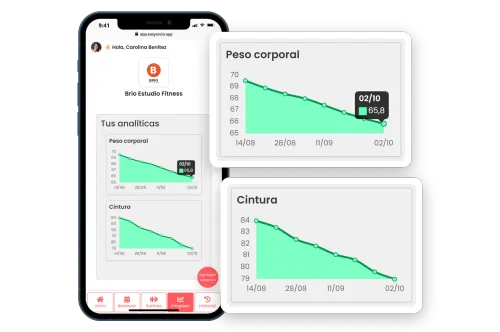
Monitor member progress smoothly and clearly—your clients will appreciate it, and so will you.
Start for freeNo credit card required
Phone with the EasySocio member app on the Progress tab, with charts of a member’s body weight and waist going down from August to October, enlarged in two cards.
CREATE ROUTINES WITHOUT PULLING MUSCLES

Easy Workout Routine Builder 💪

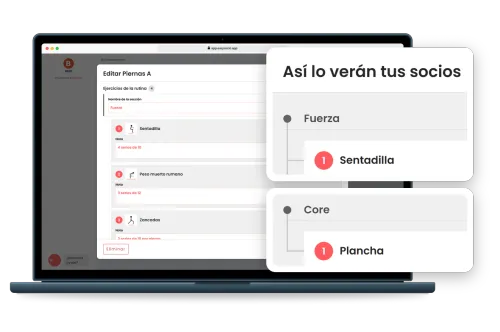
Quickly build and share detailed workout routines, complete with videos and images. Split exercise-based routines into sections such as Mobility, Strength or WOD, with the exercises numbered from 1 in each one, and your members see them just as neatly laid out on their phone.
Start for freeNo credit card required
Laptop with a workout being built in EasySocio, split into sections: a strength section with its numbered exercises. Two cards show how members see it: each section under its own heading, with the exercises numbered from 1.
ANOTHER MEMBER ASKING WHAT TO TRAIN TODAY?

Week-by-Week Training Programs 🗓️

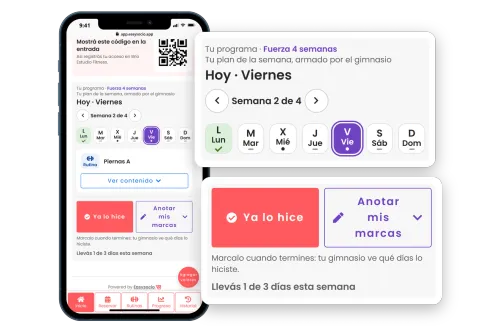
Build a plan of up to 12 weeks with a routine and a diet for every day. Members see today’s plan, check the day off when they finish, and you follow each week from their profile.
Start for freeNo credit card required
Phone with the EasySocio member app and the card for his training program, and two cards that enlarge the week’s plan with today (Friday) and the “I did it” button, which the member taps to check off the day so the gym can see which days he trained.
STILL EXPLAINING EVERY EXERCISE FROM SCRATCH?

Your Own Exercise Library 🏋️

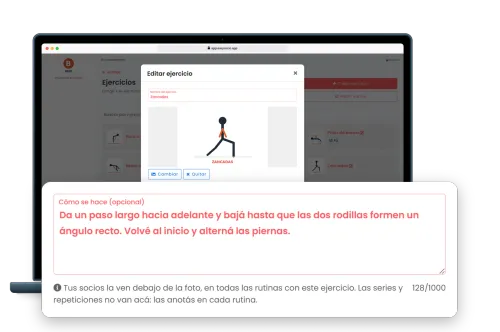
Set up each exercise once, with a photo, a YouTube or Vimeo link and a “How it’s done” explanation, and it’s ready to add to any routine. Members see it all on their phone.
Start for freeNo credit card required
Laptop with the gym’s exercise library in EasySocio, each exercise with its pictogram, and the edit window for lunges open. A card enlarges its “How it’s done” explanation and the note that members see it in every routine that includes the exercise.
SMARTER DECISIONS, FEWER HEADACHES

Easy Analytics 📈

Make informed choices easily with clear, actionable insights—no math required!
Start for freeNo credit card required
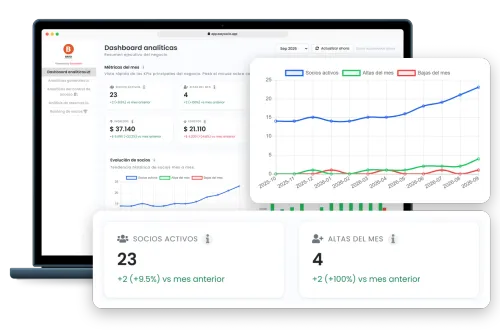
EasySocio analytics dashboard on a laptop with September selected, highlighting 23 active members and 4 new sign-ups for the month, both up on the previous month, and a 12-month chart where active members grow from 14 to 23.
WHO STOPPED RENEWING? EASYSOCIO FLAGS THEM

Member Win-Back Alerts ⏰

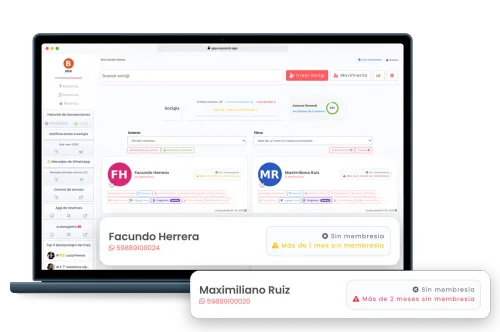
The member list flags anyone who has gone more than 1 or 2 months without a membership, and the dashboard shows how many members with an active membership haven’t checked in at all in the last 30 days, and whose memberships are about to expire.
Start for freeNo credit card required
EasySocio member list on a laptop, filtered to members who have gone more than a month without a membership: each one shows their WhatsApp number and a notice of how long it has been since they renewed, and two cards enlarge the notices for more than 1 month and more than 2 months without a membership.
SIGN-UPS MADE STRESS-FREE

Easy Self-Registration 🚀

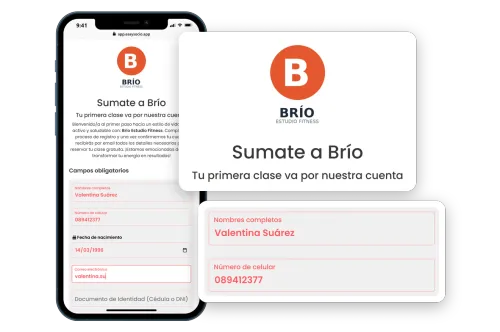
Let your members register themselves online in seconds—because paperwork is so last decade.
Start for freeNo credit card required
Phone with a gym’s self-registration page in EasySocio, with the logo, the welcome title and the form half filled in, enlarged in two cards.
WHERE WAS THAT SETTING AGAIN?

Settings That Are Easy to Find ⚙️

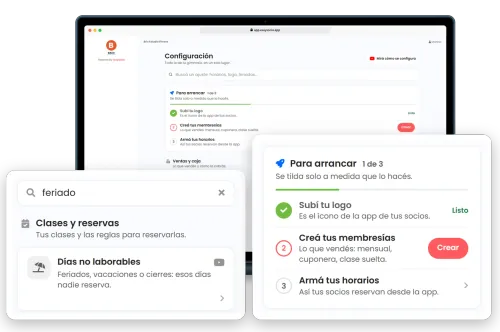
Everything you can set up lives on one page, grouped by topic, with a line that says what each setting is for. At the top, a search bar understands everyday words: type “holiday” and Non-working days shows up. And if you’re just starting out, Getting started lists the first steps (your logo, your memberships and, with online bookings, your class schedule) and checks each one off as you go.
Start for freeNo credit card required
Laptop showing EasySocio’s Settings page with Getting started · 1 of 3 above the topics. One card zooms in on the search bar with “feriado” (holiday) typed and the only setting left, Non-working days, under Classes and bookings. Another zooms in on Getting started, with the progress bar at one third: Upload your logo, done; Create your memberships, with its Create button; and Set up your schedule.
ARE YOUR MEMBERS IN AN EXCEL SPREADSHEET?

Import Members from Excel 📥

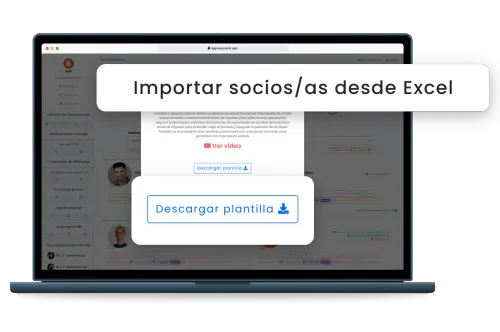
Download the template, fill in each member’s name and mobile number (plus their email, date of birth and ID number, if you have them) and upload the file: EasySocio creates the members and tells you how many it imported.
Start for freeNo credit card required
Laptop with the EasySocio window for importing members from Excel, with its instructions, and two cards that enlarge the window’s title and the button to download the template.
WHICH PLAN FITS YOU BEST?

Prices

Only pay for what you use. No hidden fees, no surprises—cancel anytime.

Every feature, on every plan

Yes, the free one too. Nothing here is locked behind a paywall: the only thing that changes between plans is how many members you can register.

Included in every plan

Your gym’s own app, on your members’ phonesNew

Your logo and your name on their home screen. Members install it from your link, without going through any app store, and open it with one tap to check their bookings, workout and membership.

See how it works
  • Membership Management
  • Access Control
  • Online Schedule
  • Products and Stock Management
  • Multiple locations at no extra cost

One exception: facial recognition and turnstile integrations are quoted separately. Wiring faces to hardware is a whole other level of tech magic. 🤖🔐

It is USD 25 a month on top of your plan, and nothing else: no setup or installation fees. See how access control works

You’re viewing prices for Singapur. If that’s not your country, select a different one from the flag.

08000+

30 members

Free

Free

Up to 30 members

Free

forever

Baby

Up to 100 members

USD 14

/month

Starter

Up to 200 members

USD 20

/month

Estandar

Up to 400 members

USD 30

/month

  • No credit card required
  • Member app with your logo, on every plan New

How does the free plan work? Free gym software →

Showing 1 of 3

image-paypal
image-master
image-visa
image burppes
Burpees
Pricing Notes
If you have more than 8000 members, don't worry about the price. Contact us for a personalized quote.
Adding a location doesn’t change the price: the plan is based on the number of members across the whole gym, counting every location.
FREQUENTLY ASKED QUESTIONS

FAQs

Can't find your answer? Reach out—we're happy to help!

The software includes access control with notifications for expired memberships, ensuring only authorized members can enter, and integrates with facial recognition devices for enhanced security, all managed by EasySocio.
In the member list, the birthday alert shows who has a birthday in the next 10 days, with their WhatsApp number right there so you can wish them a happy birthday. On the day itself, EasySocio also sends a birthday email to every member with an email address on file: it goes out once someone at the gym opens EasySocio that day, with a ready-made text you can customize.
Yes, the software allows trainers to create and assign diet plans with detailed instructions, including videos and images, accessible by members through their mobile devices, enhancing their overall fitness journey, supported by EasySocio.
The inventory management system helps track stock levels, monitor sales, and make informed decisions, preventing losses and ensuring smooth operation of the gym’s retail section, facilitated by EasySocio.
With the daily cash register and your analytics. The first time, you count the cash and bring the register up to date; from then on, if the cash is off at closing, the difference is recorded with the amount already filled in. Your analytics show income, expenses and profit without counting withdrawals, and the register’s transactions can be exported to Excel. For your profit to be accurate, every expense and every withdrawal has to be recorded. The count isn’t saved as a cash-up record, and EasySocio doesn’t connect to your bank.
The software automatically gathers ratings and comments from members, providing valuable insights to improve services and enhance member satisfaction with the help of EasySocio.
The software includes features like unlimited attendance tracking, automatic renewals, and custom membership plans, ensuring efficient administration and increased member retention through EasySocio.
Yes, both, with the family plan. For a family, the payer buys the membership and you pick the other people from your members. For a corporate deal where the company pays, add the company as one more member: it’s the payer (if each employee pays for themselves, a membership at the agreed price is enough). Each person is a member with their own profile and phone number. Only time-based memberships (monthly, quarterly or any length you choose) can be family plans, not class packs, and there’s no per-person price: the membership has a single price.
From the member list, download the Excel template, fill in each member’s name and mobile number (plus their email, date of birth and ID number, if you have them) and upload the file. EasySocio creates the members and tells you how many it imported, so you can bring them over from a spreadsheet, or from any system that exports to Excel, without adding them one by one.
Members can easily book and cancel classes online, streamlining the process and avoiding manual scheduling through apps like WhatsApp, ensuring a smooth and organized booking experience with EasySocio. The gym, in turn, sees the week in a calendar, with how full each class is.
It’s a screen to keep on display at your gym, on a TV for example, showing today’s classes, who booked each one, the spots left and this month’s ranking. When a member books or cancels, it updates on its own within seconds.
EasySocio automatically emails each member when they buy a membership, a few days before it expires and on their birthday, and confirms every class they book by email. The purchase, expiry and birthday emails come with ready-made texts you can customize with the member’s name, membership and expiry date.
Yes. In Settings → Logo and email you add your gym’s email (for Gmail, with an app password) and, when you save it, EasySocio tests it: it connects and signs in without sending any email, and tells you whether it works. You can also tap “Test now” at any time. If it stops working later, the owner sees it on the dashboard’s home screen with what to check, and in the meantime emails to members go out from EasySocio with the gym’s name: they still get them, although if they reply, the reply doesn’t reach the gym’s inbox.
Trainers can create detailed workout plans, including videos and images, and assign them to members who can access their routines via mobile devices, making training guidance easily accessible through EasySocio. And if a routine is split into sections, members see those headings inside their training program too.
Trainers can build programs of 1 to 12 weeks with one routine and one diet per day and assign them to each member from their profile, while members see today’s plan in their own panel and mark each day as done, all through EasySocio.