
Multi-location gym software that doesn’t charge per location
All your locations in one account: each one with its own cash register, stock, front desk and classes, while members and memberships are shared. You add a new location from Settings and your price stays the same, on the free plan too.
Functionalities
Ditch the spreadsheets! EasySocio makes gym management as smooth as a skipping rope in beast mode 🔥. From memberships and client tracking to access control, online bookings, and automated expiration reminders—we handle the details so you can focus on growing your business and enjoying the fun parts of your work, not the tedious ones. 🎉
The location, always on screen 📍
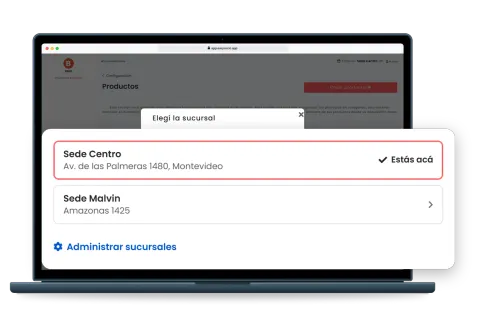
Every location lives in the same account. The top bar shows which location you’re working in and the browser tab carries its name, so nobody takes a payment at one location thinking they’re at another. Switching takes one tap, in a window that lists each location with its address.
Each location with its own cash register and stock 💸
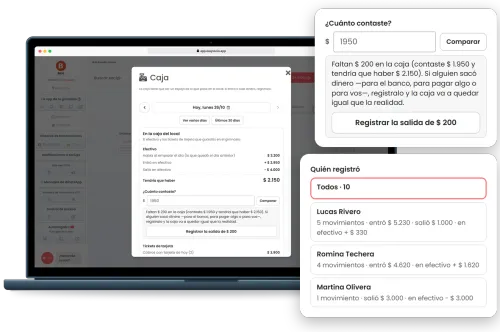
Payments taken at a location go into that location’s cash register, and if a payment is voided from another location, it comes out of the register where it was taken; at closing, each location’s register is counted to see whether it balances. Each location keeps its own stock of every product, with one catalog and the same prices for all. Receipts show the location’s name, address and phone number, and the money in and out report adds a table with each location’s net cash and the total for the period.
Members check in and book at any location 📲
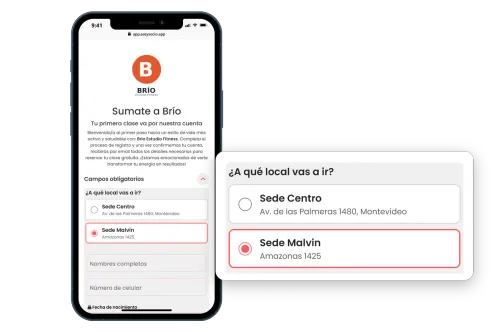
Members belong to the gym, not to one location: with the same membership they check in and book anywhere. In the app they pick the location when booking a class and see its schedule, and the confirmation says where it is. People who sign up through self-registration choose which location they’ll go to, and each member’s profile shows bookings, check-ins and payments from every location, each with where it happened. Schedules belong to each location, and a closure day can close just one.
Access control at every location 🚪
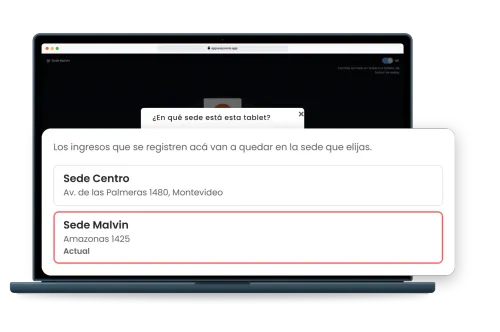
Each location opens its own access control screen, with the location’s name at the top, and check-ins are recorded there. The location is picked right from the tablet. Since it’s all one account, a check-in deducts at most one class, and if the member already booked a class for today at any location, no other class is deducted.
Staff accounts per location, or for all of them 👥
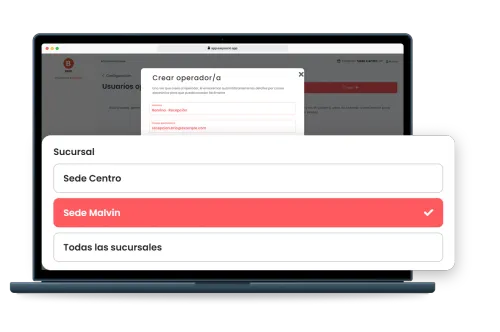
When you create an account for someone on your team, you choose which location they work at, or all of them. Staff at one location see and manage that location’s bookings and can’t void payments from another. Staff on all locations can work at any of them, including the ones you add later. And if someone moves, you change their location from their account.
Plans go by members, not by locations
Every feature, multiple locations included, on every plan. The price depends on how many members the gym has across all its locations, and a member who trains at two of them counts once.
Every feature, on every plan
Yes, the free one too. Nothing here is locked behind a paywall: the only thing that changes between plans is how many members you can register.
Included in every plan
Your gym’s own app, on your members’ phonesNew
Your logo and your name on their home screen. Members install it from your link, without going through any app store, and open it with one tap to check their bookings, workout and membership.
See how it works- Membership Management
- Access Control
- Online Schedule
- Products and Stock Management
- Multiple locations at no extra cost
One exception: facial recognition and turnstile integrations are quoted separately. Wiring faces to hardware is a whole other level of tech magic. 🤖🔐
It is USD 25 a month on top of your plan, and nothing else: no setup or installation fees. See how access control works
30 members
Free
FreeUp to 30 members
Free
forever
Baby
Up to 100 members
USD 14
/month
Starter
Up to 200 members
USD 20
/month
Estandar
Up to 400 members
USD 30
/month
- No credit card required
- Member app with your logo, on every plan New
How does the free plan work? Free gym software →
Showing 1 of 3


Everything about running multiple locations
What gym owners ask when they open a second location or already run a small chain of gyms.